

If your eyes feel tired, dry, or achy by the middle of the afternoon, you are probably not imagining it. Extended screen time puts the visual system under a kind of sustained demand it was never built for, and the result has a name: computer vision syndrome. Also referred to as digital eye strain, it affects a surprisingly large portion of the workforce, and most people dealing with it have no idea that their workstation setup is making things considerably worse.
Computer vision syndrome is not just about tired eyes. Left unaddressed, it tends to pull in the neck, shoulders, and head too, creating a cluster of symptoms that compound over a long workday. The good news is that most causes are manageable, and adjustments to the workspace can make a real difference.
What Computer Vision Syndrome Actually Is
The American Optometric Association defines computer vision syndrome as a group of eye and vision-related problems that result from prolonged use of digital devices, including computers, tablets, e-readers, and phones.
The term covers a range of symptoms, from blurred vision and dry eyes to headaches and neck pain, that develop during or after sustained screen use.

The condition is more widespread than most people realize. A systematic review and meta-analysis found a pooled prevalence of computer vision syndrome of around 69% across global studies, meaning roughly seven out of ten people who use screens regularly experience symptoms.
Research estimates that nearly 60 million people suffer from the condition worldwide, with a million new cases reported each year. The average office worker spends around seven hours a day in front of a screen, which places most desk-based employees comfortably within the highest-risk category.
Symptoms That Are Worth Recognizing

Computer vision syndrome tends to announce itself gradually, and many people attribute the symptoms to tiredness, stress, or dehydration rather than to their screen habits. The more common signs include:
- Dry, burning, or itchy eyes
- Blurred or fluctuating vision, particularly toward the end of the day
- Eye fatigue or a heavy feeling in the eyes
- Headaches, particularly around the forehead or behind the eyes
- Neck and shoulder pain or stiffness
- Difficulty maintaining focus after long screen sessions
- Increased light sensitivity
Research has found that over 52% of people with computer vision syndrome report reduced work productivity as a result. The symptoms are not usually permanent, but they do worsen over time if the underlying causes are not addressed.
Why Screens Are Harder on the Eyes Than Reading a Book
It is not immediately obvious why looking at a screen should be more demanding than reading a book. The difference comes down to how the eyes actually work when processing digital content.
You Blink Far Less Than Normal
Blinking helps keep the eyes lubricated and clear. Under normal conditions, we blink around 15 to 20 times per minute. When focusing on a screen, that rate drops dramatically. Research from the University of Iowa found that people blink about 66% less while working at a computer, leaving the eye surface exposed and drying out much faster. That dryness is often the first and most persistent symptom of computer vision syndrome, and it feeds directly into the blurred vision and irritation that many desk workers experience through the afternoon.
Your Eyes Are Constantly Refocusing
When you work at a screen, your eyes are in constant motion: moving across lines of text, shifting between the screen and a document on the desk, adjusting focus for different distances, and tracking elements on the page. Each of those shifts requires the eye muscles to work. Unlike reading a static printed page, where focus stays relatively stable, screen work keeps the accommodative muscles in a near-continuous cycle of contraction and relaxation. Over hours, that sustained effort produces fatigue in the same way any overworked muscle would.
What the Screen Itself Contributes
Digital screens also introduce challenges that printed materials do not. Glare from the screen surface or surrounding light sources causes eye strain, often prompting unconscious squinting or posture changes to avoid it. Contrast between on-screen text and the background is typically lower than that between printed text and the background. Many monitors emit blue light, which makes it harder for the eyes to focus and settle. Older or lower-quality monitors may also produce a flicker at certain refresh rates that the eyes pick up subconsciously and respond to with additional effort.
When Your Workstation Setup Is Making Things Worse
Computer vision syndrome is not purely a screen problem. The way the monitor is positioned relative to the body significantly affects how hard the eyes and surrounding muscles have to work.
Monitor Distance Matters More Than Most People Think

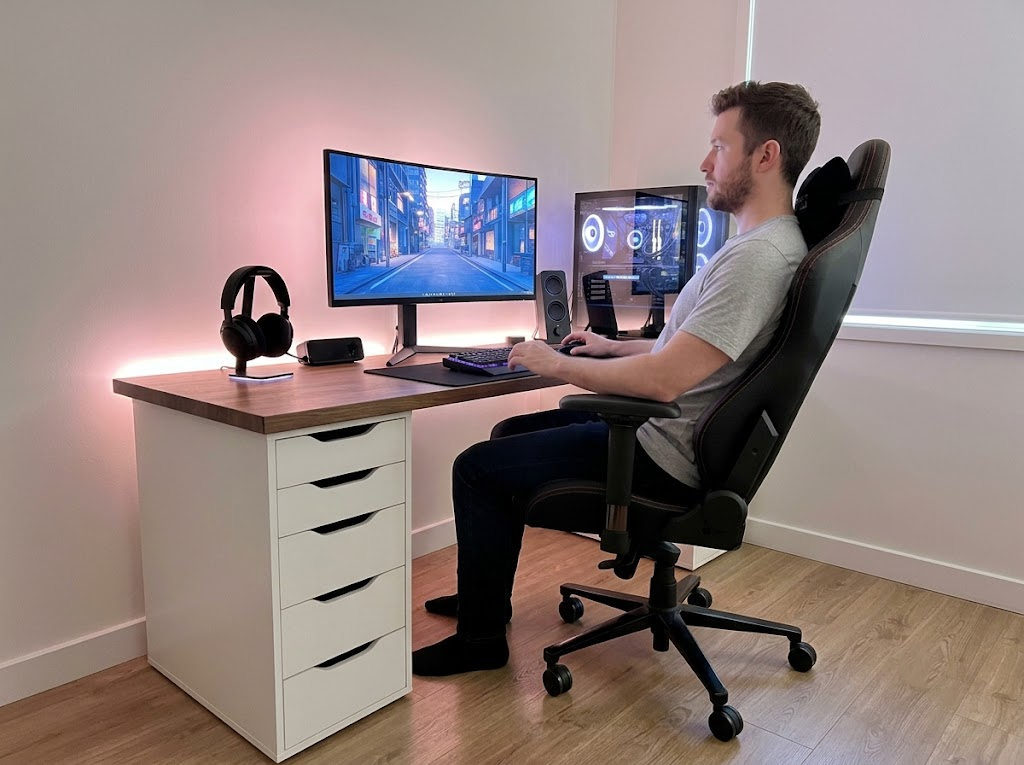
Screens positioned too close force the eyes into sustained close focus, which accelerates fatigue. Screens placed too far away tend to cause people to lean forward, which shifts weight onto the neck and upper spine. The recommended viewing distance for a monitor is between 20 and 28 inches, roughly an arm’s length away, with the top of the screen sitting at or just below eye level.
That last detail matters a lot. When the monitor is too high, the eyes are forced to look upward, which increases the exposed surface area of the eye and accelerates tear evaporation. When it is too low, the head tilts forward and down, loading the neck muscles. A screen at a slight downward angle reduces both eye-surface exposure and postural strain simultaneously.
Poor Monitor Height Connects Directly to Neck and Shoulder Pain

A display screen that is too high or too low causes the head, neck, shoulders, and back to adopt awkward positions that compound fatigue over the course of a full day. People who work with their chin tilted upward or their head bent forward to compensate for a poorly placed screen develop the neck and shoulder tension that many associate with screen-related discomfort, without ever connecting it back to the monitor’s placement.
Ergonomics guidance from CCOHS notes that postural discomfort and aches in the neck and shoulders are among the most common complaints from computer users, and that they frequently trace back to improper monitor placement rather than any inherent problem with the work itself.
Lighting and Glare Are Often Overlooked

Many workstations are set up with overhead fluorescent lights directly above the screen or with windows positioned to reflect off the monitor. Both situations create glare that forces the eyes to work harder to maintain focus.
Positioning the monitor perpendicular to windows, lowering blind coverage when sunlight is direct, and using lower-wattage task lighting rather than bright overhead bulbs all significantly reduce the glare load. Anti-glare screen filters are also worth considering for workstations where the light environment cannot easily be changed.
A Few Changes That Actually Help
Most of the adjustments that help with computer vision syndrome are straightforward and do not require much time or expense.

Follow the 20-20-20 Rule
The 20-20-20 rule is a simple and well-supported habit: every 20 minutes, take 20 seconds to look at something at least 20 feet away. This gives the accommodative system time to relax, allows blinking to restore the tear film, and reduces the cumulative strain that builds over long sessions. Research reviewing its effectiveness found it to be a genuinely useful non-pharmacological intervention for reducing computer vision syndrome symptoms among office workers.
Adjust Your Screen Settings
Screen brightness should roughly match the ambient brightness of the room. A screen that is noticeably brighter or dimmer than its surroundings forces the eyes to adjust constantly between the two. Increasing text size reduces the effort the eyes must exert to resolve fine details. Most modern operating systems also include a night mode or a warmer color-temperature setting for the afternoon, which reduces the intensity of blue light during the hours when prolonged exposure is most fatiguing.
Position the Screen Properly
Run through this quick check for your current setup:
- Screen distance: roughly an arm’s length away, or 20 to 28 inches
- Screen height: the top of the monitor at or just below eye level
- Screen angle: slightly tilted back so the bottom of the screen is closer than the top
- Screen position: directly in front of you, not to one side
- Glare check: no reflections from windows or overhead lights on the screen surface
Proper monitor setup can reduce eye strain symptoms by up to 60% within the first week of implementation, which makes it one of the most effective and accessible changes available to screen workers.
Where Ergo Global Comes In
Computer vision syndrome is one of several conditions that develop when a workstation is not set up to suit the person using it. At Ergo Global, we address this as part of a broader look at how each individual’s workspace works for them.
Our certified ergonomists conduct personalized workstation assessments both on-site and virtually, covering monitor placement, lighting, posture, and screen habits, as well as musculoskeletal risk factors.
We also deliver ergonomics training and team programs that help employees understand how their screens affect their eyes and bodies, and what to do about it. Eye strain and screen-related discomfort are preventable.
Reach out to the Ergo Global team and let us take a proper look at your setup.