

You know the feeling. That dull ache creeping up the back of your skull by mid-afternoon, the tension sitting heavy across your shoulders, the stiffness that makes turning your head feel like an effort. If that sounds familiar, there is a good chance tech neck is behind it.
The good news is that learning how to fix tech neck does not require a dramatic lifestyle overhaul. A handful of smart changes, a few minutes of daily movement, and a better desk setup can go a long way.
So, What Is Tech Neck Exactly?
Tech neck refers to the strain and structural changes that develop in the cervical spine from prolonged forward head posture during screen use.
According to the Mayo Clinic Health System, it describes any form of chronic neck or shoulder pain, soreness, or stiffness caused by poor posture while using technology. The condition affects office workers, students, remote workers, and anyone who regularly uses a phone or computer.

And unfortunately, it’s becoming all too common, with 73 percent of university students and 64.7 percent of people working from home experiencing neck or lower back pain, according to a 2022 study in Acta Medica Academia. Research published in the European Spine Journal also identifies tech neck as a growing global concern, noting that among 15 to 19-year-olds, the World Health Organization already ranks neck pain as the 8th most common cause of years lived with disability.
The condition develops gradually, which is part of why so many people miss the early warning signs until the discomfort becomes harder to manage.
The symptoms vary from person to person depending on how long the condition has been developing. Early signs include:
- Neck stiffness and soreness, especially toward the end of the day
- Tension or aching between the shoulder blades
- Recurring headaches, often originating at the base of the skull
- A forward head position that feels difficult to correct
- Reduced range of motion when turning the head left or right
- Occasional pain radiating down into the shoulders or upper arms
When left unaddressed, tech neck can progress into more serious complications, including nerve compression, disc degeneration, and chronic postural misalignment.
How to Fix Tech Neck with These 8 Proven Methods

The methods below range from immediate habit adjustments to professional interventions. Each one is practical, and using multiple approaches together consistently produces significantly better results than relying on any single fix.
Method 1: Postural Correction and Body Awareness
Difficulty: Easy | Effectiveness: High (when practiced consistently)
The most direct way to fix tech neck is to address its root cause: head position. A neutral head posture means the ears are stacked directly over the shoulders, and the chin runs roughly parallel to the floor.
Throughout the day, do regular posture checks. When the chin drifts forward, gently draw it back. A simple phone alarm or a posture-correction app can prompt you to reset your alignment every hour.
Cornell University’s ergonomics program recommends a 20-8-2 sitting pattern: for every 30 minutes of work, spend 20 minutes seated, 8 minutes standing, and 2 minutes moving or stretching. This rhythm prevents any single position from compressing the spine for too long.
Postural correction alone provides limited relief for pain that has already built up over months. Over time, however, it stops the condition from progressing and amplifies the results of every other method on this list.
Method 2: Ergonomic Workstation Setup
Difficulty: Easy to Moderate | Effectiveness: Very High
Poor workstation setup is one of the biggest contributors to tech neck in office workers. Getting ergonomics right removes strain at the source, making all other recovery efforts more effective.
Monitor Height and Placement
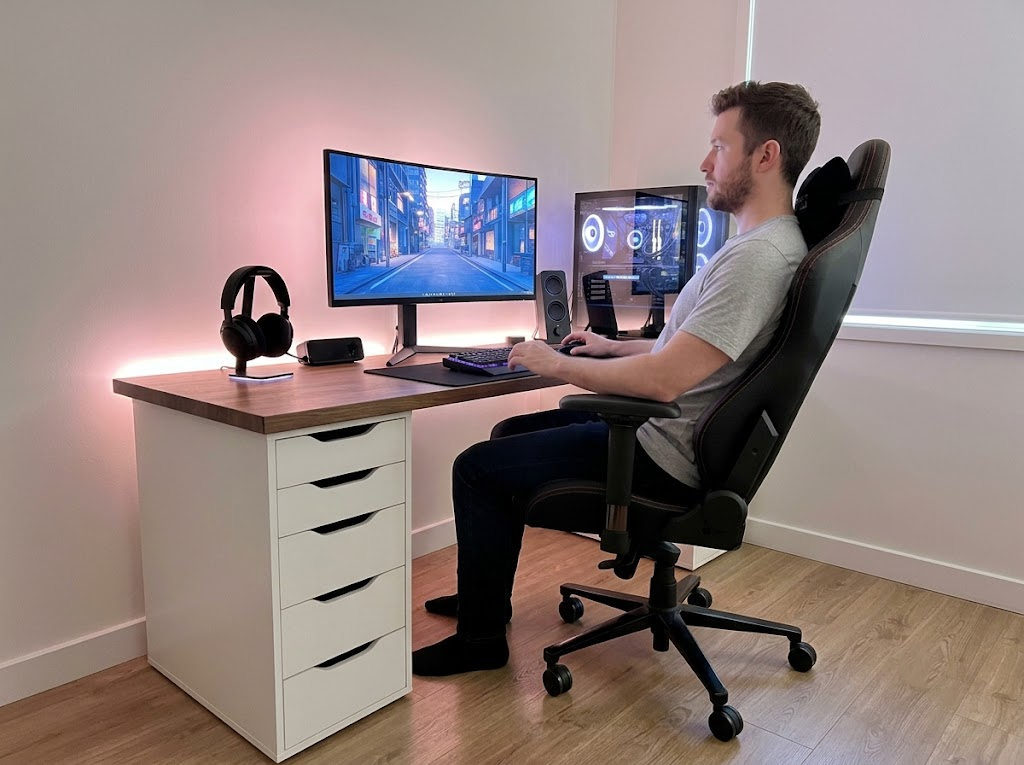
OSHA’s Computer Workstations guidance recommends positioning your monitor so that the top edge of the screen is at or just below eye level, with a viewing distance of approximately 20 to 30 inches (50 to 76 cm) from your face. This allows the eyes to look slightly downward without tilting the head forward.
Laptop users face a particular challenge here, since laptop screens are almost always too low when the device sits flat on a desk. A laptop stand paired with an external keyboard and mouse raises the screen to a healthy height without sacrificing functionality.
Chair and Sitting Posture
Sit with feet flat on the floor, knees at approximately 90 degrees, and the lower back supported by the chair’s lumbar support. Shoulders should be relaxed, and elbows should rest at roughly desk height. An ergonomic chair with adequate lumbar and headrest support significantly reduces the postural load that your muscles must compensate for across a full workday.
Phone and Tablet Habits
Raise your phone to eye level when using it for extended periods. Phone stands and tablet holders are inexpensive tools that reduce the downward neck angle during reading and scrolling sessions.
Method 3: Smarter Screen Time Habits
Difficulty: Easy | Effectiveness: Medium
How long you spend in a fixed position matters as much as the position itself. Research from OrthoCarolina recommends changing positions every 15 to 30 minutes to reduce cumulative muscular fatigue and joint stress. Stand up, walk briefly, roll your shoulders, and reset your posture. These micro-breaks, practiced regularly throughout the day, make a meaningful difference in neck comfort and recovery over time.
Method 4: Heat and Cold Therapy
Difficulty: Very Easy | Effectiveness: Medium (symptom relief)
Heat and cold therapy do not correct the underlying postural cause of tech neck, but they provide meaningful relief that makes it easier to stretch, exercise, and function comfortably day to day.
- Heat (a heating pad, warm towel, or warm shower applied for 15 to 20 minutes) loosens tight muscles and improves blood circulation. Apply heat before stretching or exercise sessions for best results.
- Ice (always wrapped in a cloth, never applied directly to the skin, for 10 to 15 minutes at a time) helps reduce inflammation and localized acute pain, particularly after a demanding day at the screen.
Use heat when the primary complaint is stiffness, and ice when dealing with acute pain or inflammation.
Method 5: Targeted Resistance Training
Difficulty: Moderate | Effectiveness: Very High (long-term correction)
Strengthening the muscles that support the cervical spine and upper back is one of the most reliable methods for lasting tech neck correction. Weak deep neck flexors, lower trapezius muscles, and scapular stabilizers are extremely common in people with tech neck. Building these muscles creates a structural support system that helps keep the spine aligned even during long work sessions.
Exercises such as face pulls, band pull-aparts, and bent-over rows are highly effective for rebalancing the upper body and reducing the forward pull on the cervical spine. Progressive resistance training, performed consistently over weeks, produces the most durable improvements.
Method 6: Visit Your Medical Provider
Difficulty: Low effort | Effectiveness: High (for persistent or severe cases)
If you have worked through the methods above and your neck pain has not improved, it is time to see your medical provider. Discomfort that lasts beyond a few weeks, or pain that keeps coming back, is a sign your situation needs a proper assessment.
Your provider can examine your posture, rule out underlying conditions, and recommend a treatment plan suited to your specific situation. This might involve guided rehabilitation, hands-on treatment, or further investigation if the pain has a deeper cause.
Some symptoms warrant a visit sooner. If your neck pain comes with radiating arm pain, tingling, numbness, or weakness in your hands, book an appointment before continuing with self-treatment. These signs can point to nerve involvement that benefits from professional evaluation.
6 Best Stretches To Fix Tech Neck

If you’re experiencing a stiff or sore neck from too much screen time, stretching can provide immediate relief. Try these easy, effective neck stretches that target the neck and upper body muscles to help release tension, improve flexibility, and reset your posture.
1. Chin Tucks
Targets: Deep cervical flexors, suboccipital muscles
Difficulty: Easy | Effectiveness: Very High
Chin tucks are the single most recommended exercise for correcting forward head posture. Research confirms they directly activate the deep cervical flexors while simultaneously stretching the compressed muscles at the base of the skull.
How to do it:
- Sit or stand with your spine tall and your shoulders relaxed.
- Without tilting your chin up or down, slide your head straight backward as if making a double chin.
- Hold for 3 to 5 seconds, feeling a gentle stretch at the base of the skull.
- Return to the starting position slowly.
- Perform 10 to 15 repetitions, twice daily.
2. Doorway Chest Opener
Targets: Pectoral muscles, anterior shoulders
Difficulty: Easy | Effectiveness: High
Tight chest muscles pull the shoulders forward and reinforce the rounded, hunched posture associated with tech neck. This stretch targets that pattern directly.
How to do it:
- Stand in a doorway and place both forearms on the doorframe, elbows bent at 90 degrees.
- Step forward with one foot until you feel a stretch across your chest and the front of your shoulders.
- Keep your shoulders drawn down and back throughout the stretch.
- Hold for 20 to 30 seconds.
- Repeat 2 to 3 times.
3. Thoracic Extension Over a Chair
Targets: Thoracic spine, upper back extensors
Difficulty: Easy | Effectiveness: High
Prolonged sitting rounds the upper back, which directly worsens forward head position. Thoracic extension mobilizes the upper spine and opens the chest, countering that pattern.
How to do it:
- Sit in a chair and position your upper back against the top of the backrest.
- Support your head gently with your hands.
- Slowly arch your upper back over the top of the chair, opening your chest and looking upward.
- Hold for 5 to 10 seconds, then return to the starting position.
- Perform 8 to 10 repetitions.
4. Shoulder Blade Squeeze (Scapular Retraction)
Targets: Rhomboids, mid-trapezius, lower trapezius
Difficulty: Easy | Effectiveness: High
This exercise activates the muscles that draw the shoulder blades back and down, directly opposing the forward-hunched posture of tech neck. It can be performed discreetly at your desk.
How to do it:
- Sit or stand upright with your arms at your sides.
- Draw your shoulder blades together as if trying to hold a pencil between them.
- Hold for 5 seconds, then release fully.
- Repeat 10 to 12 times.
- Perform 2 to 3 sets per day.
5. Wall Angels
Targets: Lower trapezius, serratus anterior, shoulder mobility
Difficulty: Moderate | Effectiveness: High
Wall angels are outstanding for opening the chest, waking up underused upper back muscles, and retraining full-body postural alignment. They are harder than they look, which is a telling sign of how much upper-body mobility is lost over time with tech neck.
How to do it:
- Stand with your back flat against a wall, feet a few inches from the baseboard.
- Press your lower back, upper back, and the back of your head into the wall.
- Raise your arms into a 90-degree goalpost position, keeping them pressed against the wall.
- Slowly slide your arms upward toward the ceiling, maintaining contact with the wall throughout the movement.
- Return to the starting position.
- Perform 10 to 12 repetitions.
6. Levator Scapulae Stretch
Targets: Levator scapulae, upper trapezius
Difficulty: Easy | Effectiveness: Medium-High
The levator scapulae is one of the most consistently overloaded muscles in tech neck. This stretch provides targeted relief and is particularly effective for reducing the referred headache pain that many tech neck sufferers experience.
How to do it:
- Sit or stand tall with your spine upright.
- Rotate your head to the right and look diagonally downward toward your armpit.
- Gently place your right hand on the back of your head and apply light downward pressure to deepen the stretch.
- Hold for 20 to 30 seconds.
- Switch sides and repeat.
- Perform 2 repetitions per side.
What Recovery Actually Looks Like
Fixing tech neck is a process that takes weeks to months. Research consistently shows that individuals who commit to daily exercise alongside workspace modifications see meaningful improvements in both head alignment and pain levels over time.
| Timeframe | What You May Notice |
| Week 1–2 | Reduced end-of-day stiffness, greater postural awareness |
| Week 3–4 | Fewer headaches, improved ability to maintain upright posture |
| Month 2–3 | Visible postural changes, greater neck mobility, and less frequent pain |
| Month 4 onward | Lasting improvement with continued daily consistency |
The most reliable results come from combining multiple approaches: ergonomic changes to eliminate the source of strain, targeted exercises to correct muscular imbalances, and professional support as needed. Daily consistency practiced over weeks is what drives lasting improvement.
If your symptoms include persistent severe pain, numbness, or discomfort radiating into your arms, seek a professional assessment before proceeding with self-treatment.
When to Seek Professional Support
The approaches above help most people reduce and resolve their tech neck symptoms over time. When pain has persisted for several weeks, is progressively worsening, or occurs alongside symptoms such as arm numbness or weakness, professional evaluation is the appropriate next step.
A physiotherapist can develop a program tailored to the severity and pattern of your condition, and a spine specialist can determine whether any structural changes in the cervical spine require further attention.
Struggling With Tech Neck? Ergo Global Can Help.
At Ergo Global, we take the guesswork out of ergonomics. Our consultants conduct thorough workstation assessments covering screen placement, seating position, work habits, and posture patterns, and then deliver clear, personalized recommendations tailored to your specific situation. Tech neck is one of the most common conditions we address, and we have helped numerous individuals and teams resolve it through targeted ergonomic interventions.
From one-on-one workstation reviews to company-wide ergonomics programs, our team is equipped to support you at every level. We believe that a well-designed workspace reduces pain, improves focus, and supports long-term well-being.
Visit us to explore our full range of services.
Book an ergonomic consultation with Ergo Global today and start building a workspace that works for your body.