


Carpal tunnel syndrome sneaks up on you. It starts with occasional tingling in the fingers, progresses to wrist stiffness, and eventually becomes pain that can disrupt your work and sleep. The good news is that most cases of carpal tunnel syndrome are preventable with the right ergonomics approach. Small adjustments to your workstation and daily habits can make a major difference in how your wrists feel at the end of the day.
What Causes Carpal Tunnel Syndrome?
Carpal tunnel syndrome occurs when the median nerve, which runs from the forearm into the palm of the hand, becomes compressed as it passes through the carpal tunnel at the wrist. The carpal tunnel is a narrow passageway made of bones and ligaments that also houses the tendons responsible for finger movement.
When the wrist is bent, twisted, or held in an unnatural position for extended periods, the tendons inside the tunnel can become irritated and swollen. This narrows the available space and increases pressure on the median nerve.

The result is numbness, tingling, and pain in the thumb, index, and middle fingers. Over time, the symptoms can spread up the arm and lead to weakness in the hand, making it difficult to grip objects or perform fine motor tasks. Many people first notice the symptoms at night, waking up with tingling or numbness that gradually starts appearing during the day as well.
According to the Joint Replacement Institute, an estimated 1 in 5 adults in the U.S. experience carpal tunnel syndrome. The condition is especially common among people who type for long hours, use a mouse repeatedly, or perform manual tasks involving forceful or repetitive hand motions. Women are up to four times more likely to develop the condition than men, partly due to differences in bone structure that result in a smaller carpal tunnel.
Why Ergonomics for Carpal Tunnel Matters So Much
The link between poor workstation setup and carpal tunnel syndrome is well established. When your keyboard is too high, your mouse is too far away, or your wrists rest on a hard surface while typing, your wrists are forced out of their neutral position.
According to Cardinus, keeping the wrist in a neutral position is the single most effective ergonomic step for reducing the risk of carpal tunnel syndrome. A neutral wrist is one that stays straight, bent neither upward nor downward, and not angled to either side.
Even small, sustained deviations from neutral can have a cumulative effect. Activities like typing with wrists resting on the edge of a desk, gripping tools with bent wrists, or using a mouse positioned too far from the body all force the wrist into angles that increase nerve compression over time.
Ergonomics for carpal tunnel addresses these issues systematically. Rather than treating symptoms after they appear, it focuses on designing the workspace so that the conditions for injury never develop in the first place.
10 Ergonomics Tips to Prevent Carpal Tunnel
The tips below cover the habits, equipment, and adjustments that have the biggest impact on wrist health. They apply whether you work in an office, from home, or in any role involving repetitive hand motions.
1. Keep Your Wrists in a Neutral Position
Your wrists should stay straight and aligned with your forearms while typing or using a mouse. They should not bend upward, downward, or sideways. Non-neutral positions increase pressure inside the carpal tunnel and place stress on the median nerve. This single principle is the foundation of ergonomics for carpal tunnel prevention.
2. Adjust Your Chair and Desk Height

Your chair height directly affects your wrist position. Set the chair so your elbows are bent at approximately 90 degrees and your forearms rest parallel to the floor. If the desk is too high and cannot be lowered, a keyboard tray mounted below the surface is one of the most effective fixes.
3. Position Your Keyboard and Mouse Correctly
Keep your keyboard directly in front of you, centered with your body. Place the mouse immediately beside it at the same height. Reaching outward for a distant mouse forces the wrist to deviate sideways, creating shoulder strain that travels down into the hand. Consider a compact keyboard without a number pad to bring the mouse closer to your body.
4. Avoid Resting Your Wrists on Hard Surfaces

Resting your wrists on the desk edge or keyboard frame while actively typing compresses the carpal tunnel and increases pressure on the median nerve. A cushioned wrist rest can help during typing sessions, but it should support your palm lightly rather than apply pressure to your wrist. Keep your wrists floating while you type.
5. Use an Ergonomic Keyboard and Mouse
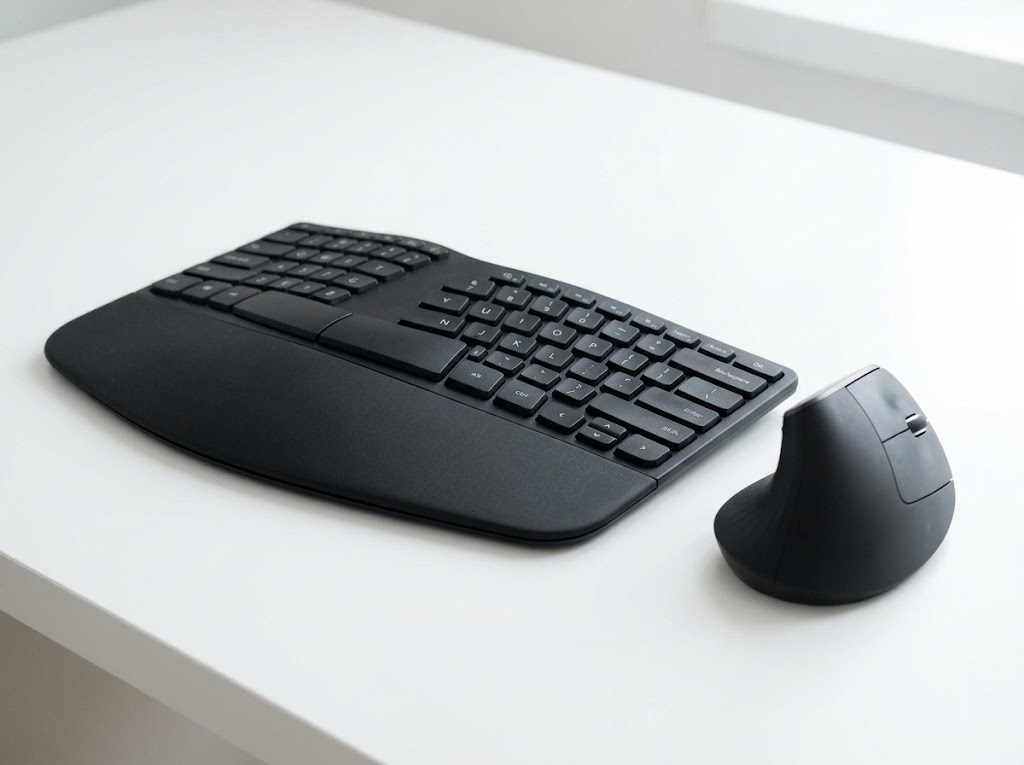
Split or tented ergonomic keyboards keep your wrists straight instead of bending inward. A vertical or contoured mouse keeps the forearm in a neutral handshake position rather than forcing it flat. These tools make proper wrist alignment almost automatic, which is why they are among the most recommended upgrades for anyone applying ergonomics to prevent carpal tunnel syndrome.
6. Take Regular Micro-Breaks
Even a perfect setup will not protect you if you type nonstop for hours. Every 30 minutes, stand up, stretch your fingers, rotate your wrists, and shake out your hands. These short pauses allow the tendons to glide smoothly, reduce swelling, and prevent the cumulative strain that leads to carpal tunnel syndrome.
7. Use a Light Touch When Typing and Gripping
Many people press harder on the keys than necessary, which transmits extra force through the tendons in the wrist. A softer keystroke reduces strain significantly over the thousands of keystrokes you make each day. The same principle applies to your mouse. A relaxed grip puts far less pressure on the carpal tunnel than a tense, claw-like hold.
8. Incorporate Wrist and Hand Stretches

Regular stretching keeps the tendons and muscles in your wrists flexible and strong. Try extending your arm in front of you with your palm down, then gently pulling your fingers back with your other hand. Open and close your fists slowly to encourage blood flow. These small exercises take seconds and can prevent hours of discomfort later.
9. Watch for Early Warning Signs
Early symptoms of carpal tunnel syndrome include tingling, numbness, or a burning sensation in the thumb, index, and middle fingers. These signs often appear at night or in the morning, then spread to daytime hours. Addressing them early through ergonomic adjustments is far easier than treating a fully developed case. Do not wait for the pain to force you into action.
10. Maintain Good Overall Posture
Carpal tunnel syndrome rarely develops in isolation. Slouching, hunching, or craning your neck forward shifts the alignment of your entire arm chain, which changes how load travels through your wrists. Keep your shoulders relaxed, your back supported by your chair, and your feet flat on the floor. When your whole body is aligned, your wrists are naturally protected.
Let Ergo Global Help You Prevent Carpal Tunnel the Right Way
At Ergo Global, we help individuals and organizations design workspaces that prevent injuries before they start.

Our qualified ergonomists assess every detail of your setup, from keyboard and mouse positioning to chair height and daily work habits, and then provide personalized recommendations tailored to your body.
With over 550,000 assessments completed across 55+ countries, we know what works and how to make ergonomic change stick. Whether you are worried about early symptoms or want to protect your entire team from carpal tunnel and other repetitive strain injuries, we have the expertise to help you work pain-free.
Ready to stop carpal tunnel before it starts?
Contact Ergo Global today for a personalized ergonomic assessment.